
Know where the day went. Prove it in one click.
Every technician's location through the day, plotted next to the stops they were supposed to make. Filter to a single customer's pool, then email that customer a map image showing your tech was there.
Included in every plan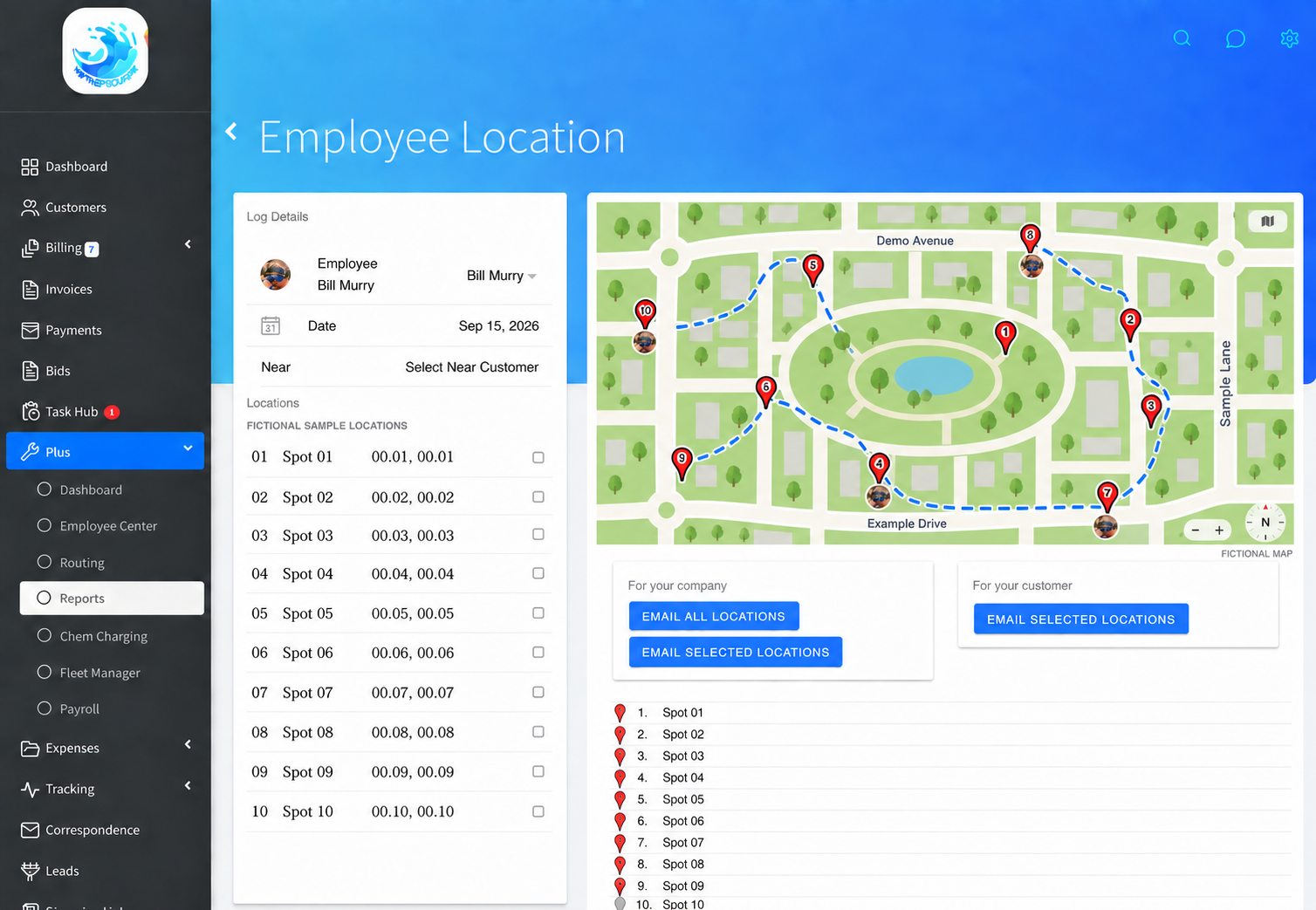
Tracking that answers real questions.
Proof of service, emailed with a map
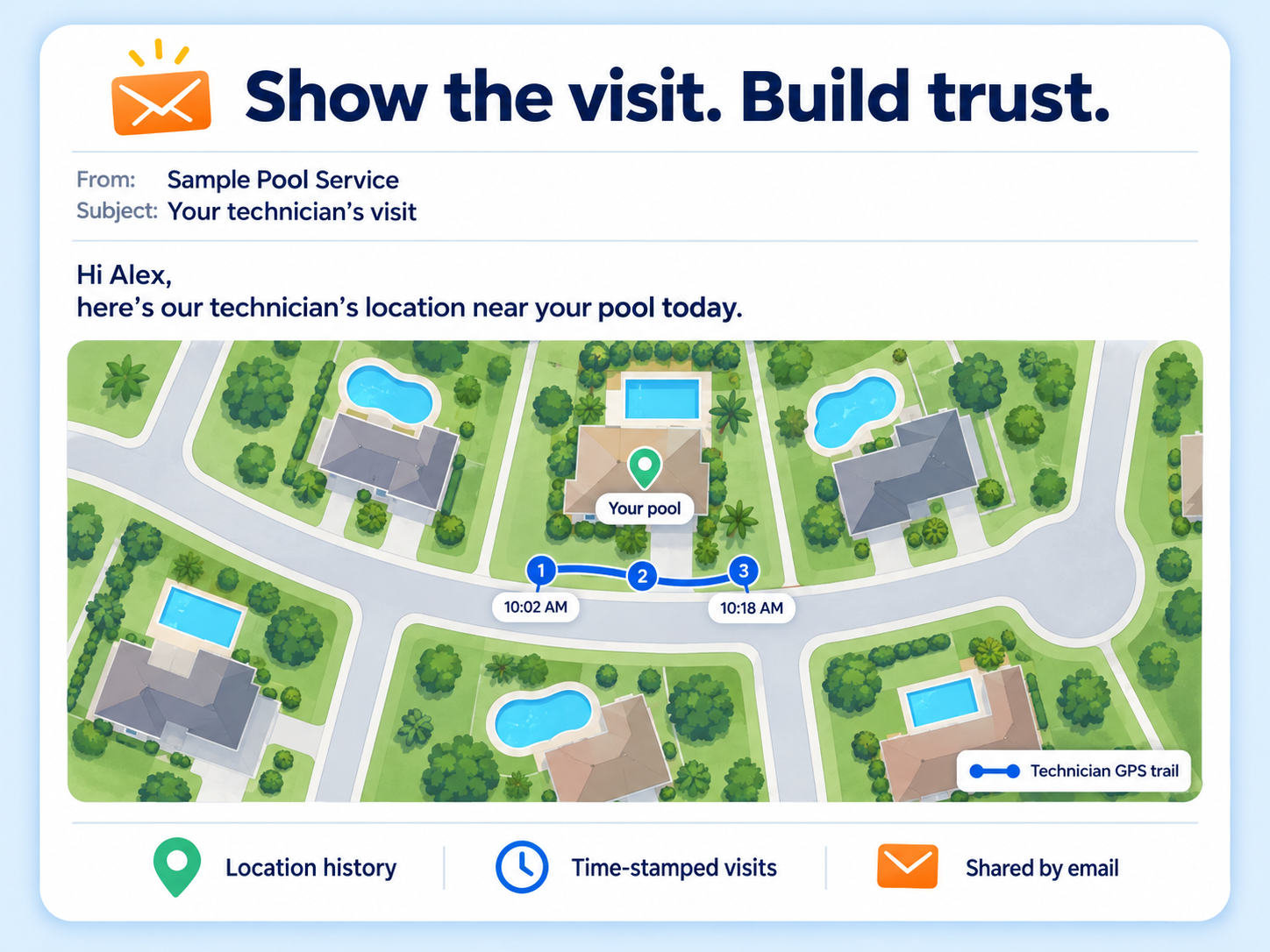
Pick the technician and the date, generate a map image of their pins around the customer's pool, and email it with your own note. The dispute ends before it starts, and the customer sees exactly what they paid for.
5-mile proximity check
Pick a customer and the map filters to pings within 5 miles of their address, sorted nearest first, with the time stamps to match.
Location history per tech, per day
Every ping is stored with latitude, longitude and the technician's local time, and queried by employee and date.
Route overlay
The same day's scheduled stops load with the pings, so you can compare where the tech went with where they were meant to go.
Last known location
The Plus control panel shows each technician's most recent location for dispatching the nearest tech to a callback.
Per-employee controls
Turn tracking on or off per employee, and set an MPH limit per employee.
Photo pins
Pins use the technician's photo, so a manager watching three trucks can tell them apart at a glance.
Fleet mileage
Vehicle records with odometer readings from truck checklists and five mileage-based maintenance reminders: oil, air filter, tire rotation, spark plugs, transmission.
A customer says nobody came.
Open Employee Location
Pick the technician and the date in question.
Read the trail
Time-stamped pings appear on the map next to that day's scheduled stops.
Filter to the pool
Select the customer. Only pings within 5 miles remain, nearest first.
Send the proof
One click emails the customer a map image with your note. Case closed.
Tracking your techs will actually use
It runs on the phone your technicians already carry. No hardware, no installer, no extra bill. Turn it on for a tech in one tap and their trail for the day shows up next to the stops they were supposed to make.
- Know where every truck is right now, and where it's been all day
- Settle "nobody came" calls with a map, not an argument
- Send the nearest tech to a callback instead of the first one who picks up
- Keep the trucks healthy too, with mileage tracking and maintenance reminders for oil, tires and more
Skimmer says it has no GPS tracking. Jobber charges $199 for it.
Skimmer's own site states there is currently no GPS tracking. Pool Brain does not list technician location tracking. Jobber lists GPS only on its Grow plan at $199 a month. Paythepoolman includes it at $50 plus $15 per technician.
"Finally!!! Paythepoolman has made our lives easier… Highly recommended."
Pinnacle PoolsGPS tracking FAQs
What does GPS tracking record?
The technician's location pings through the day, each with a local time stamp, stored per technician and date. The map shows the pings with the tech's photo as the pin, alongside that day's scheduled stops.
Can I prove a technician was at a customer's pool?
Yes. Pick the customer and the map filters to pings within 5 miles of that address, nearest first. One click generates a map image and emails it to the customer with your message.
Can I turn tracking on for some technicians and not others?
Yes. GPS tracking is a per-employee toggle, and each employee can have their own MPH limit setting.
Is GPS tracking an add-on?
No. It is included in every plan. It requires the technician to use the Paythepoolman mobile app with tracking enabled.
Works hand in hand with
See where your routes really go.
Thirty days free. Talk to a pool pro, not a ticket queue.