
Build the route in minutes. Watch the day from the office.
Weekly and bi-weekly service routes, separate repair routes, one-click optimization, drag-and-drop reordering, and a live dashboard that shows stops routed versus completed for every technician. At the pool, techs log 11 readings, chemicals, a checklist, photos and video.
Included in every plan · Orenda dosing in Plus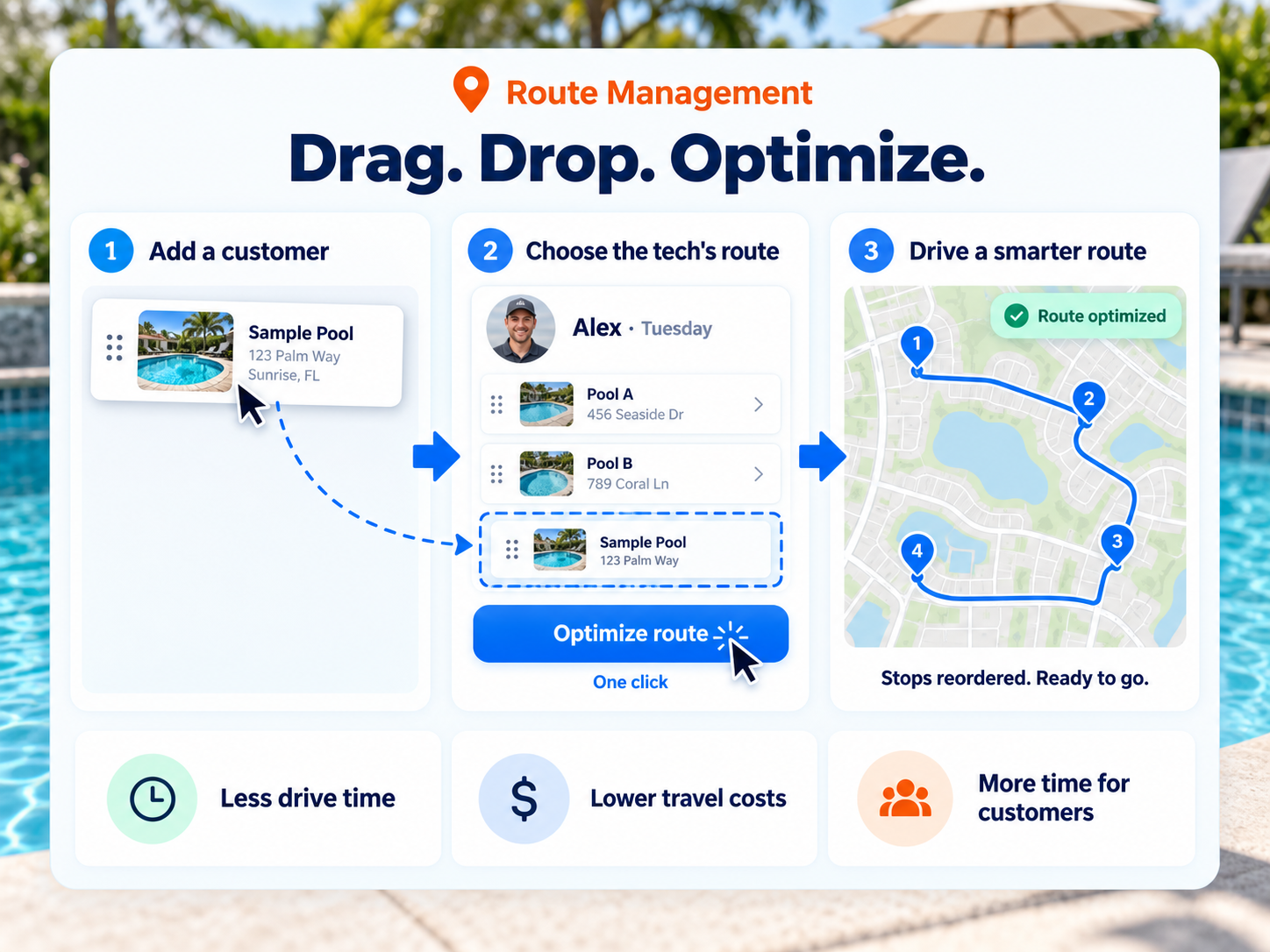
Service routes, repair routes, and everything at the stop.
One-click route optimization
Pick a technician's day and click optimize. Paythepoolman reorders up to 25 stops for the shortest drive and saves the new order straight to the route. Fewer miles, more pools, home earlier.
Live progress dashboard
Stops routed versus completed, repairs routed versus completed, percent complete per tech, and a flag for pools logged on a different day than serviced.
Drag, drop, shift
Reorder stops, move a customer to another day, push a stop to tomorrow, reassign to another tech, or temporarily shift a customer between techs.
Track the readings and chemical costs that matter to you
Log the water chemistry you care about at every stop, see at a glance when a reading is out of range, and know what every dose cost you. Chemical spend per pool and per tech, without a spreadsheet.
Electronic door hanger
After each stop, an emailed door hanger with readings and, optionally, the technician's photo. Hide chemicals or readings per customer if you prefer.
Weekly and bi-weekly scheduling
Set each customer's service days once, weekly or every other week, and they land on the right technician's route automatically.
Repair routes and calendar
Repairs run on their own routes with a drag-and-drop calendar, multi-tech repair groups, checklists and blueprints for recurring jobs.
Checklists, photos, video
Per-technician checklists, optionally visible to customers. Service and repair videos, image locations, and repair-request photos that can be emailed or texted.
A Tuesday in Paythepoolman.
Build the day
Drag customers onto a technician's day, or convert a won lead straight into route stops. Optimize the order in one click.
Work the route
The tech opens the Plus app, logs readings and chemicals, ticks the checklist, and attaches photos or video.
Tell the customer
The electronic door hanger goes out by email with the readings and the tech's photo, or by text.
Watch and adjust
The office sees percent complete per tech. Anything undone is pushed to tomorrow or reassigned with a tap.
Filters, salt cells and Service Inspector
Recurring maintenance and water trends are tracked alongside the route, so problems get caught before the customer calls.
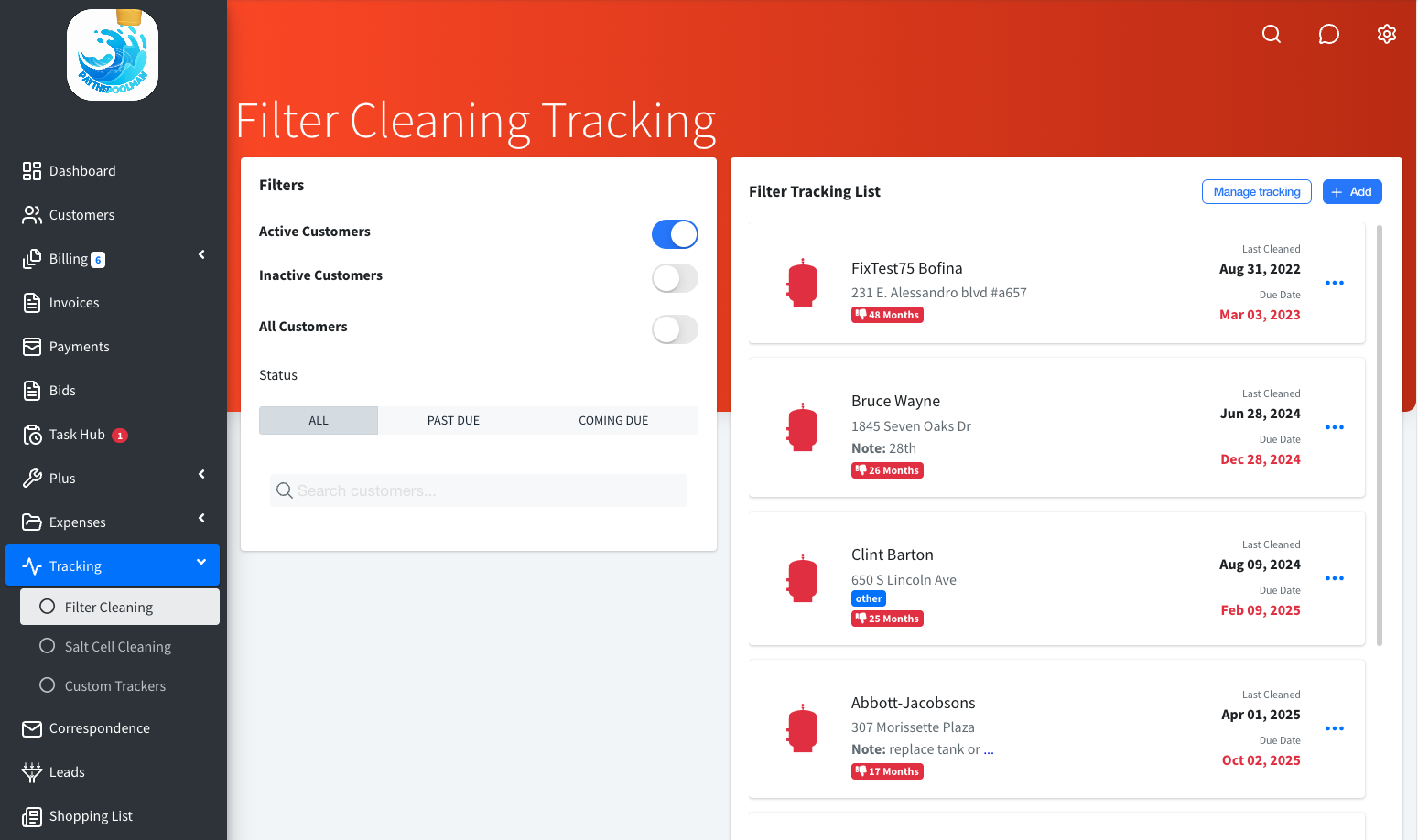
- Filter cleaning and salt cell tracking with last-cleaned and due dates, past-due and coming-due views, equipment tags, and a customer notice by text or email
- Custom trackers for anything else on a schedule
- Send a bid request straight from a filter or cell cleaning
- Service Inspector trends the last 8 service logs per pool, color-codes each reading, and writes plain-English recommendations, including a possible-leak flag when salt and conditioner both drop
- Equipment records per customer with up to 5 photos, viewable from the map pin
Route optimization is included, not a tier.
Skimmer lists route optimization only on its Scaling Up plan at $2 per pool. Jobber lists routing and GPS only on Grow at $199 a month. Paythepoolman includes optimization, repair routing and the progress dashboard at $50 plus $15 per technician.
"Paythepoolman is saving me 2-3 hours a night!!"
Cliff Side Pool ServiceRoute management FAQs
How does route optimization work?
Pick a technician's day and click optimize. Paythepoolman reorders the stops for the shortest drive, up to 25 stops per optimization, and saves the new order back to the route.
Does it support bi-weekly customers?
Yes. Mark a customer bi-weekly and Paythepoolman puts them on the route every other week automatically.
What does a technician log at each stop?
Up to 11 readings (total and free chlorine, pH, alkalinity, conditioner, hardness, phosphate, salt, TDS, water temperature and filter PSI), chemicals added with amounts converted to ounces, a checklist, photos and video.
What does the customer receive after a stop?
An electronic door hanger by email with the readings and, if you choose, the technician's photo. You can hide chemicals used or actual readings per customer.
Works hand in hand with
Run tomorrow's route in Paythepoolman.
Thirty days free. Talk to a pool pro, not a ticket queue.