
Bill every customer in one pass. Not one at a time.
Run Billing generates the month's invoices for everyone on the cycle, lets you review and add the extras your techs flagged, then sends them by email, prints them, or both. Late fees, statements, rate increases and QuickBooks sync are built in.
Included in every plan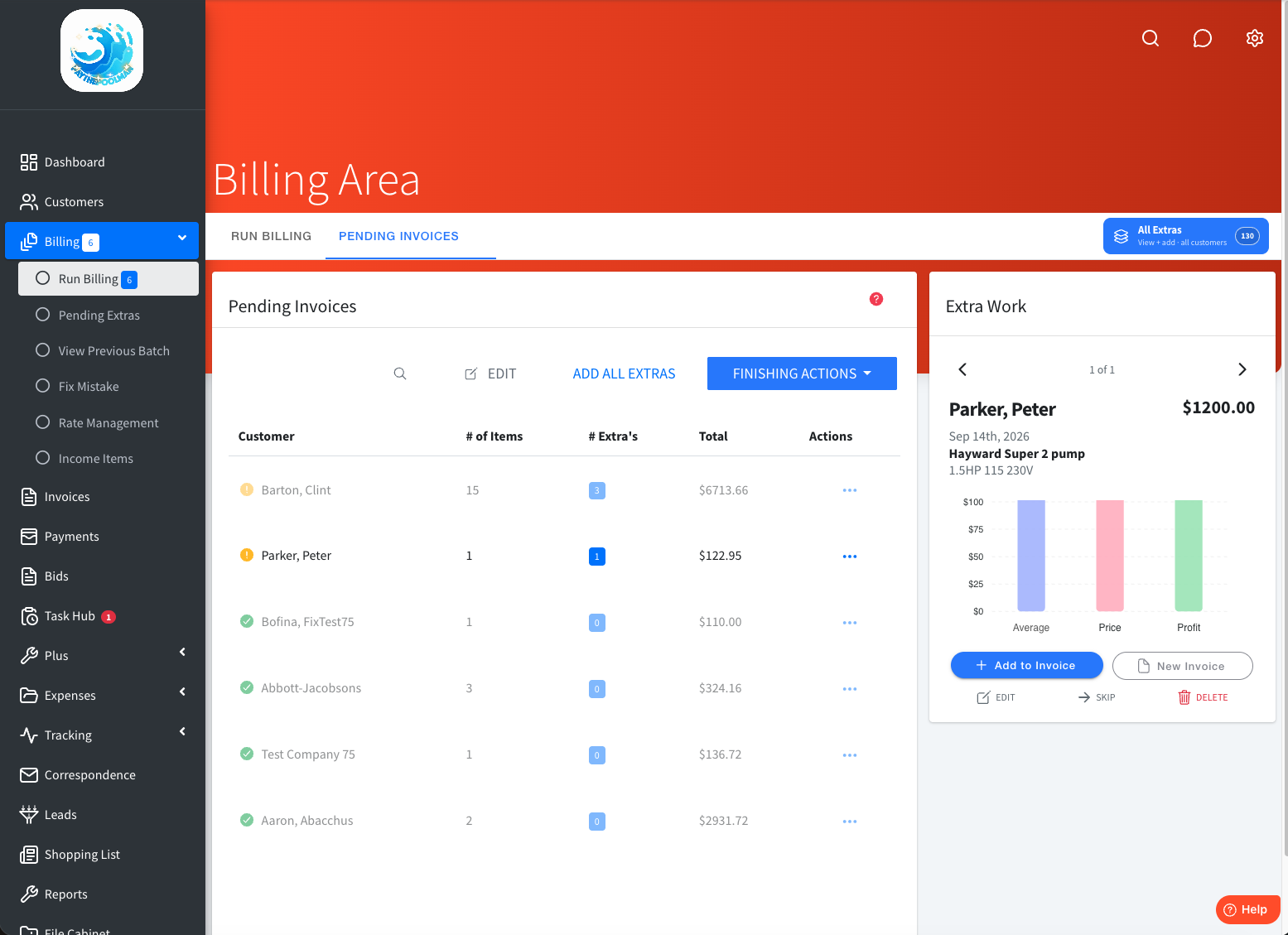
The original billing-in-minutes system for pool service.
Run Billing does the whole month at once
Choose the cycle (primary or secondary billing cycle, weekly, or per stop) and every customer on it gets a pending invoice. Review the batch, add every extra your techs logged in one click, then send. What used to take a weekend takes a coffee break.
Late fees, statements and reminders
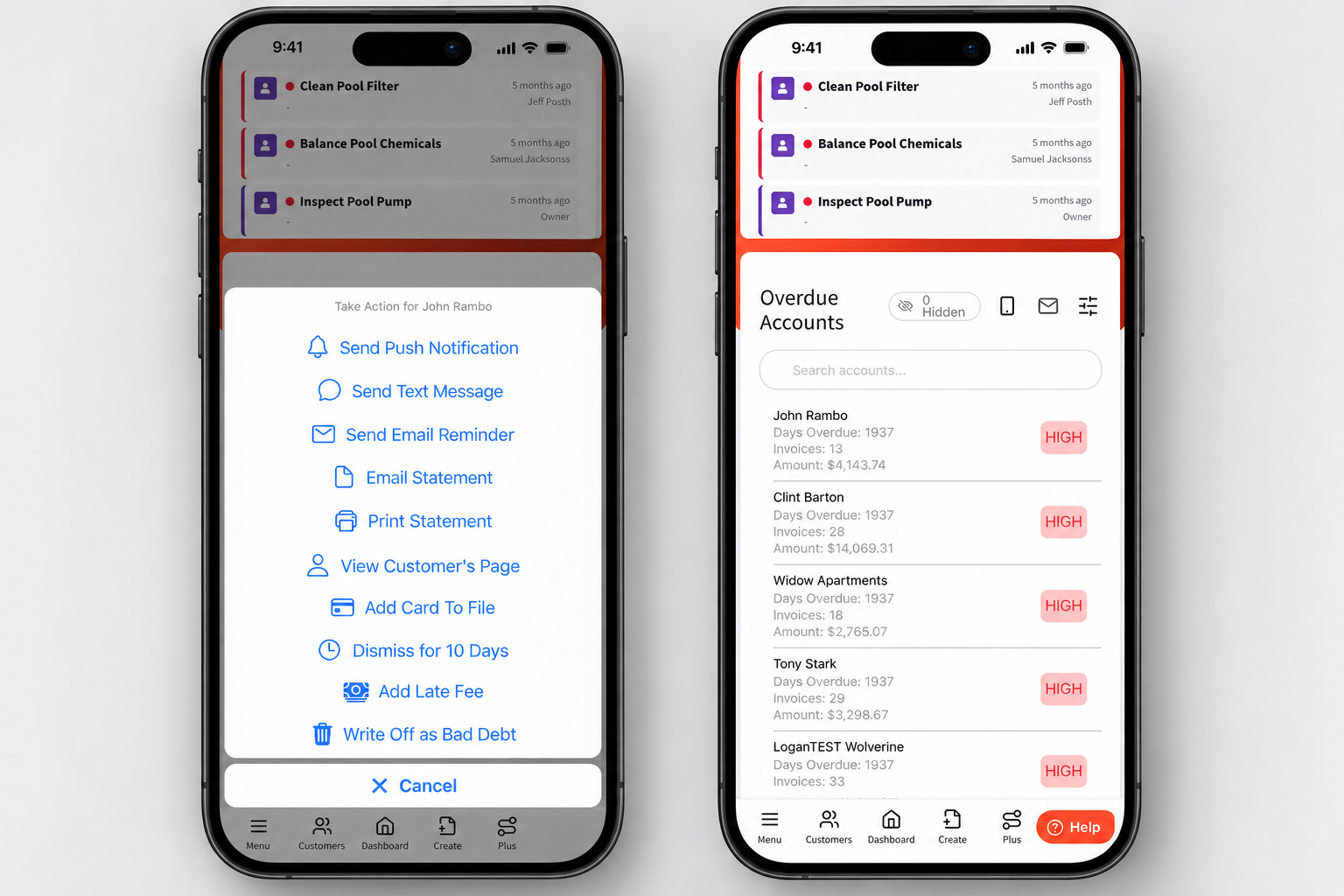
Set a company late fee once and add it to any overdue invoice. Send a Late Statement by email or PDF, a reminder by text or push, or grant an extension, all from the overdue feed.
Email, print, or both
Each customer has a delivery preference. Batch PDFs can go straight to a mailing service.
Rate increases in bulk
Raise rates for one customer or all of them, with a printable rate-increase flyer and a mass-increase PDF for the mailing.
Convenience fees*
Turn on a card convenience fee and Paythepoolman applies it as its own line item, so processing costs you nothing.
Invoices from anywhere
Create an invoice manually, from an approved bid, from a repair request, or from pending extras.
Clear statuses
Not Paid, Partial Paid, Paid, Pending and Bad Debt, plus Overdue by due date. Partial payments recalculate status automatically.
QuickBooks Online sync
Push customers, items, invoices, payments, expenses and bids to QuickBooks Online with per-entity sync stats. QuickBooks Desktop importer included.
Your billing cycle, in four steps.
Run the cycle
Open Run Billing and pick the primary or secondary billing cycle. Every customer on that cycle gets a pending invoice.
Add the extras
Chemicals, parts and repairs your techs logged in the field are added to the right invoices in one click.
Send it all
Email, print or both, per customer preference. Invoices sent by text carry a secure payment link.
Chase what's late
The overdue feed shows who owes what. Add a late fee, send a statement or reminder, or extend the due date.
Reports that close the month
Invoicing ties into the reporting you need to run collections and file taxes, all exportable as PDF.
- Invoice Report, Payment Report and Customer History as on-demand PDFs
- Late Invoice, Collection, Bad Debt and Unpaid Pending Invoice reports
- Auto-Charging Report with retry of failed monthly cards
- Sales Tax and Services Tax reports with line-level drill-down
Everyone invoices. Not everyone bills a whole route at once.
Skimmer, Pool Brain, Jobber and Pool Office Manager all list invoicing. Paythepoolman adds a batch billing pass on a primary or secondary billing cycle with a review queue, mass rate increases with a printable flyer, and text-message invoices with a payment link, at $50 plus $15 per technician.
"I enjoy Paythepoolman because it saves me time on billing and communicates with my clients very well."
Hydrobright PoolsInvoicing FAQs
How does monthly billing work?
Open Run Billing, choose the cycle (primary or secondary billing cycle, weekly, or per stop), and Paythepoolman generates a pending invoice for every customer on that cycle. Review the pending list, add extras from the field, then send everything by email, print, or both in one click.
Can I send invoices by mail?
Yes. Batch invoices generate as PDFs for printing, and can be handed to a mailing service. Each customer has a delivery preference: email, print, or both.
How are late accounts handled?
Set a company late fee once and add it to any overdue invoice as a line item. Send a Late Statement by email or PDF, a reminder by text or email, grant a payment extension, or write off bad debt, all from the overdue accounts feed on the dashboard.
Does it sync with QuickBooks?
Yes. Connect QuickBooks Online and push customers, items, invoices, payments, expenses and bids, with sync statistics per entity. A QuickBooks Desktop importer is also available.
Works hand in hand with
Run next month's billing in minutes.
Thirty days free. Talk to a pool pro, not a ticket queue.
* Convenience fees and card surcharges are regulated by state law and card-network rules, which vary by location. It is your responsibility to confirm they are permitted where you operate and to comply with your local laws before turning them on.