
Get paid from the job site or the customer's couch.
Every invoice carries a secure payment link. Customers pay by card, ACH, Apple Pay or Google Pay*, or you put them on autopay and never think about it again. Convenience fees pass the processing cost to the customer.**
Included in every plan · card processing fees apply, or pass them on with convenience fees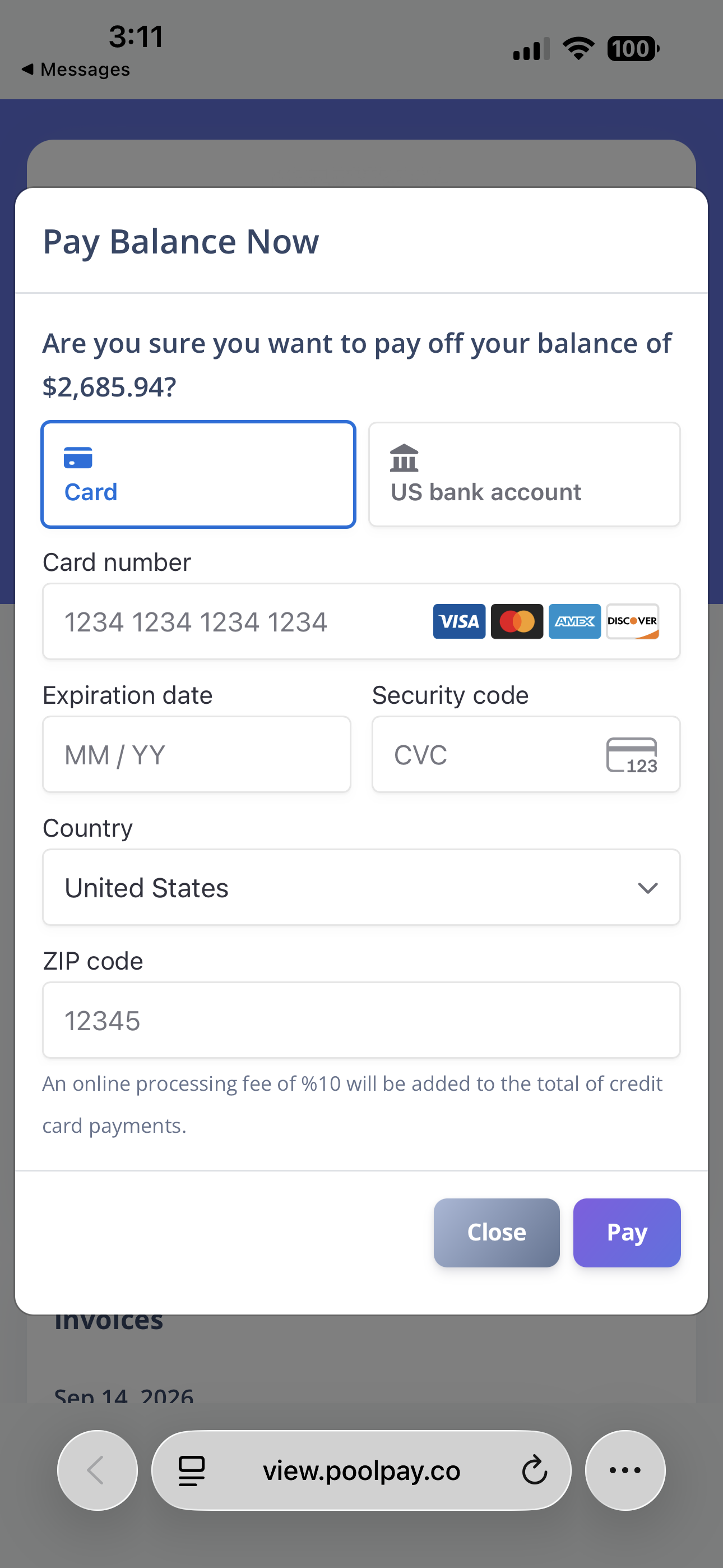
Every way a customer wants to pay, and a few they didn't know about.
Convenience fees: the customer covers the card fee**
Turn it on, set the rate, and the fee is added to every card payment as its own line item. A company running $20,000 a month through cards at a typical 2.9% rate hands the processor about $7,000 a year. With convenience fees on, that stays in your account.
Cards on file and autopay
Store a card, charge it against any invoice, and turn on monthly auto-charging. The invoice pays itself on the 1st. Failed charges surface in the Auto-Charging Report for retry.
Cards, ACH, Apple Pay, Google Pay*
Card payments through Stripe on every plan. ACH bank transfer, Apple Pay and Google Pay are company-level toggles that unlock with the Pool Junction add-on.
Request a card by text
Text or email the customer a secure link to add or update their own card. No card numbers over the phone.
Deposits on bids
Require a deposit on any estimate with a deposit type and amount, collected through the same portal.
Your own branded payment portal
Every invoice and bid links to a secure portal page, valid for 30 days, where the customer views and pays. It's your portal, not a generic checkout: add a welcome message, and feature an image or a video your customers see every time they open it. Holiday hours, a thank-you from the owner, a look at the crew.
Partial payments and refunds
Apply any amount and the invoice status recalculates automatically. Refund a card payment through Stripe from the customer's record.
Manual payments and receipts
Record cash, check, card, PayPal, ACH or other, attach a photo of the check, and apply it to an invoice or leave it as credit on account.
From invoice to money in the bank.
Connect Stripe
Link your Stripe account in Company Settings and toggle on Apple Pay, Google Pay and ACH.
Send the invoice
By email, text or push. Each carries a secure link to the customer's payment portal.
Customer pays
In full or in part, with a card, a wallet or their bank. Status updates automatically.
Or never ask again
Put recurring customers on autopay. The monthly invoice charges the card on file.
Collections without the awkward calls
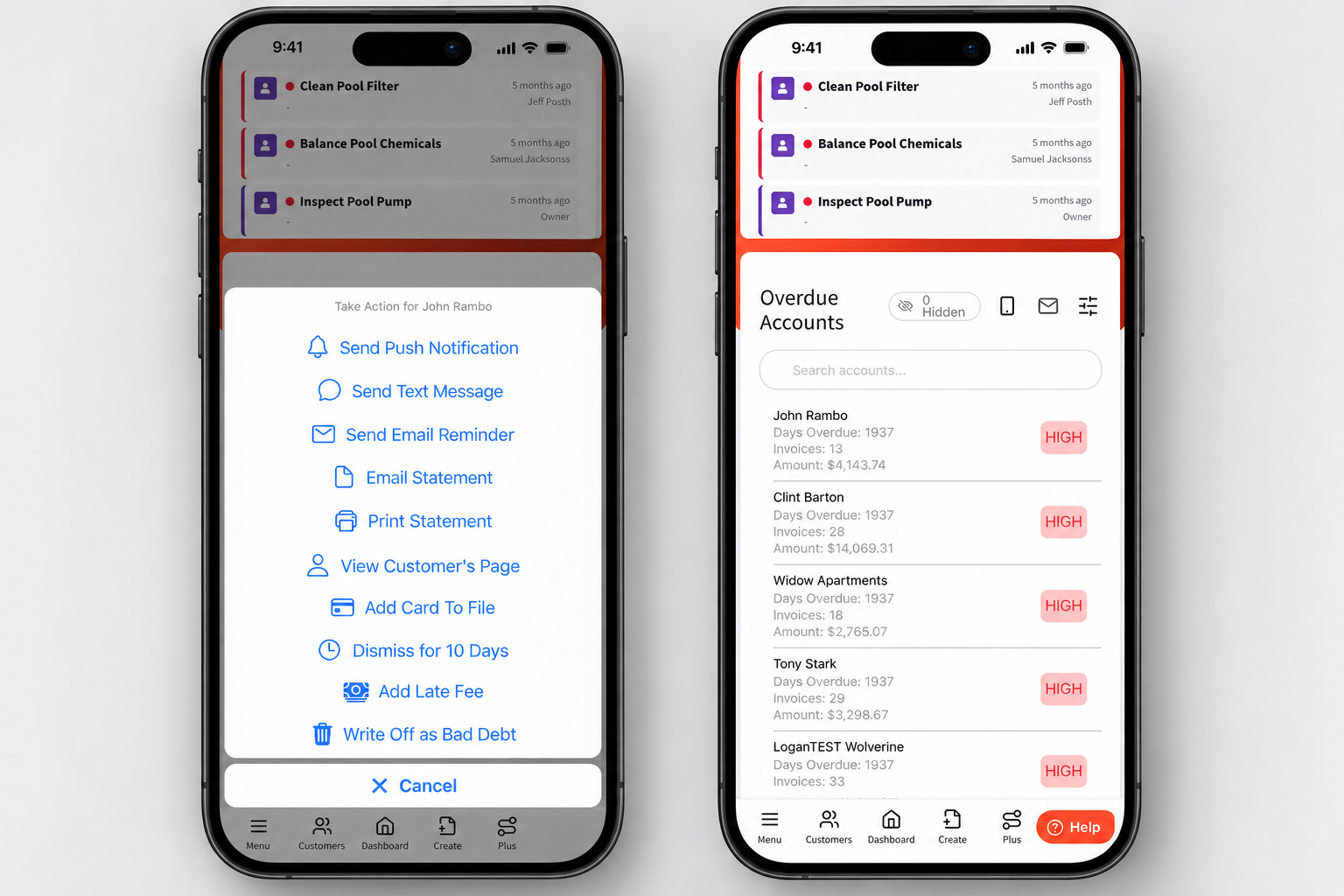
The overdue accounts feed on your dashboard puts every late customer in one place with one-tap actions.
- Send a payment reminder by push, text or email with the customer's own portal link
- Mass text every past-due customer at once, each with their own link
- Email or print a statement, grant a payment extension, add a late fee, or write off bad debt
- Overdue notices are held for 10 days so customers aren't nagged twice
Payments are table stakes. Convenience fees and wallets are not.
Skimmer, Pool Brain and Jobber list online payments and autopay. Pool Office Manager lists Stripe integration. Paythepoolman adds Apple Pay, Google Pay, ACH, card requests by text, deposits on bids and convenience fees that zero out your processing cost, all included at $50 plus $15 per technician.
"Best app for pool techs on the market. Never chase money again. Get paid and send receipts all from the job site. Amazing app."
Travis Legg, pool service ownerOnline payments FAQs
What payment methods can my customers use?
Visa, Mastercard and other cards through Stripe, ACH bank transfer, Apple Pay and Google Pay. Apple Pay, Google Pay and ACH are toggles you turn on in the payment portal settings. Manual payments can be recorded as cash, check, credit card, PayPal, ACH or other.
How does autopay work?
Store the customer's card, or text them a secure link to add it themselves, and turn on monthly auto-charging. The monthly invoice charges the card on file and any failures appear in the Auto-Charging Report for retry.
Can I pass the processing fee to the customer?
Yes. Turn on the convenience fee and set the rate. It is applied as its own line item so the card processing costs you nothing.
Are refunds and partial payments supported?
Yes. Refund through Stripe from the customer's record. Partial payments are applied to the invoice and its status recalculates to Partial Paid or Paid automatically.
Works hand in hand with
Stop chasing checks.
Thirty days free. Talk to a pool pro, not a ticket queue.
* Card payments are available on every plan. ACH, Apple Pay and Google Pay require the Pool Junction customer app add-on.
** Convenience fees and card surcharges are regulated by state law and card-network rules, which vary by location. It is your responsibility to confirm they are permitted where you operate and to comply with your local laws before turning them on.